

Documents
Documents Tabs
The Documents tab lists the documents provided for the account, for both individual and company accounts. For a company account, documents are grouped under the Company, Legal representative, and UBO tabs. If there are none, the tab displays "There are no documents at the moment".
Rejected Documents
Select a document with the status Rejected to see why it was rejected. In the Document details column, a red chip under the document type shows the reason in the format Rejected: {reason}. For example, a document rejected as BLURRY displays Rejected: Blurry document.
If no reason is available, the chip displays Rejected: Other.
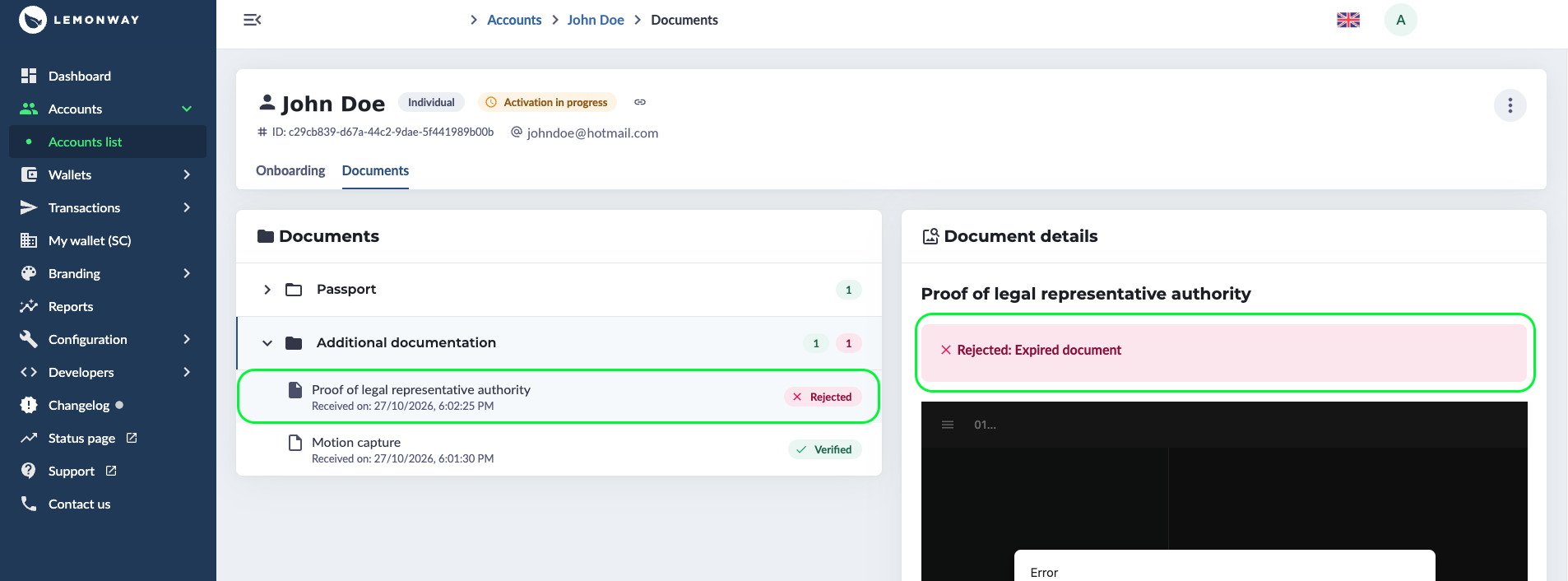
Dashboard: Document rejected with reason
File Requirements
To avoid another rejection, make sure the file meets these requirements:
- Format: JPG, JPEG, PNG, or PDF. A PDF can have a maximum of 2 pages. TIFF is not accepted.
- Size: between 100 KB and 4 MB for automatic verification. Files over 4 MB, up to 10 MB, are validated manually.
- Quality: full colour, straightened, legible, and undamaged. The document must not be blurry, pixelated, cropped, or affected by glare.
- Sides: for documents with two sides (for example, an identity card), include both sides in one file.
- Validity: the document must not be expired.
- Language: French, English, Spanish, Italian, or German. For other languages, provide an official translation in one of these.
Rejection Reasons and Actions
The reason is the subStatus value of the rejected document, shown in the language of your Dashboard (English, French, Italian, Spanish, or German).
subStatus value | Reason displayed | Action |
|---|---|---|
NOT_SIGNED | Document not signed | Document must be signed to be accepted. |
MISSING_PERCENTAGES | Missing shareholding percentages | Document must account for all shareholder percentages. |
MISSING_UBO_IDS | Missing UBO identity documents | Identity documents of the UBOs are a legal requirement and therefore onboarding will be rejected. |
MISSING_SIDES | Missing side(s) | Upload the document again with both sides in one file. |
WRONG_DOCUMENT_TYPE | Wrong document type | Ensure that the correct document type is uploaded. |
NOT_REQUIRED | Document not required | No action needed. |
ORGANIZATIONAL_CHART_REQUIRED | Organizational chart required | Provide an up-to-date organizational chart. |
UNOFFICIAL_DOCUMENT | Unofficial document | An official version of the document must be provided. |
MISSING_DATE | Missing date | The document must show the date visibly. |
BLURRY | Blurry document | A sharp, legible copy in full colour must be uploaded for our systems to recognise the text without making errors. |
EXPIRED | Expired document | Only a valid document is accepted; all expired documentation will be rejected. |
IMAGE_QUALITY | Poor image quality | Upload a legible, full-colour image of at least 100 KB, without pixelation, cropping, or glare. |
WRONG_INDIVIDUAL | Wrong individual | A document belonging to the wrong person will be rejected. You must upload the document that belongs to the correct person. |
INCOMPLETE | Incomplete document | The document must be complete, with no part cropped. |
INVALID_FORMAT | Invalid format | The document must be a JPG, JPEG, PNG, or PDF file (maximum 2 pages). TIFF is not accepted. |
OTHER | Other | Contact support for more information. |
What to do next?
To help end users resolve issues with their rejected document, generate a new link and send it to them.
Onboarding Link RegenerationThe link remains valid for 7 days. Should the end user fail to click the link within these 7 days, you must generate a new link.
Updated about 1 hour ago