

Handling KYC updates
1. How do I handle KYC Updates?
1.1 What is it?
KYC updates are a core component of maintaining accurate user records at Lemonway, forming part of an ongoing, periodic process that ensures compliance and data integrity throughout the entire account lifecycle. As part of the process, we invite users to review and refresh their KYC data at the defined intervals outlined in this document. This document helps understand the process and outlines who is and is not concerned, and what can be done to ensure smooth updates for your clients.
1.2 Who is concerned?
All users with an active business relationship and a validated account are required to participate. Categories include:
| Profile | Activity |
|---|---|
| Merchant | Marketplace |
| Seller | Marketplace |
| Investor / Lender | Crowdfunding |
| Project Holder | Crowdfunding |
| Creditor | Company & Sole Traders |
| Content Editor | Company & Sole Traders |
| Other Operator | Platform Operators |
| Visa Applicant | Other |
Note
- Migrated Accounts: Clients that have opened a payment account before the online onboarding activation and that have been linked to an Account via the migration process are included in the KYC Update process.
- Partners with KYC Premium Process: Included in the KYC update process with specific communication workflow. See your account manager.
1.3 Who is excluded?
- Users with technical wallets only
- Buyers
- Donors
- Operators
- Payers (Visa Application account activity)
2. KYC Refresh Rate
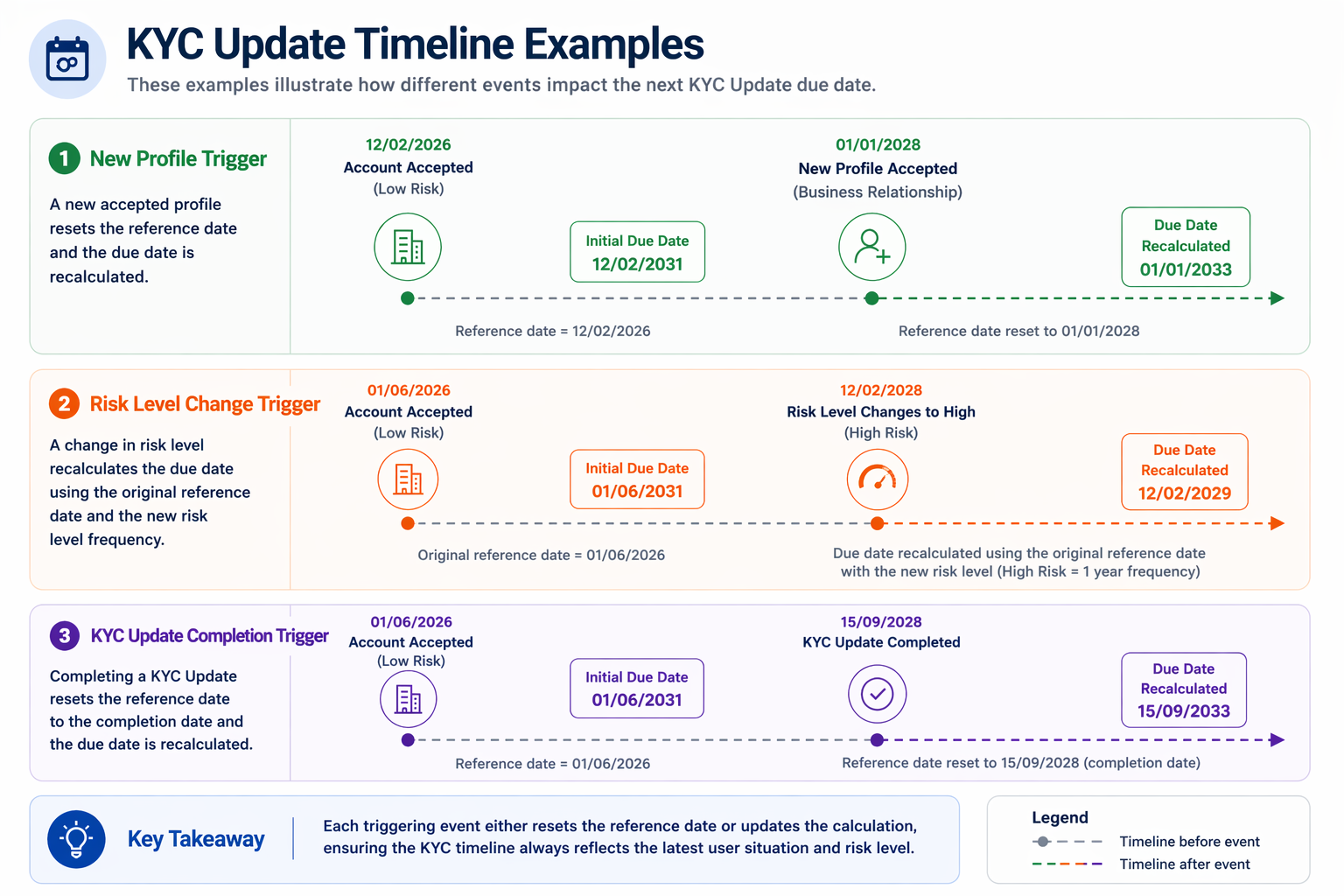
KYC updates at Lemonway are based on an event-driven model. Rather than being fixed at onboarding, the next KYC update due date evolves throughout the account lifecycle. Each time a relevant event occurs, the system:
- Identifies a reference date (linked to the triggering event).
- Applies the current risk level of the end-user.
- Recalculates the next KYC Update due date accordingly.
2.1 Why is this essential?
It ensures that KYC obligations remain:
- Aligned with Lemonway's regulatory requirements.
- Information changes according to the latest risk profile.
- Information is synchronised with the most recent business activity.
| Trigger Event | Reference Date Used | Risk Level Applied | Resulting Action |
|---|---|---|---|
| Account accepted (onboarding) | Account acceptance date | Initial risk level | Calculate the next KYC update due date |
| New profile accepted | New profile acceptance date | Current risk level | Recalculate due date |
| Risk level change | Account acceptance date | New risk level | Recalculate due date |
| KYC update completed | KYC updates completion date | Current risk level | Recalculate due date |
KYC refresh depends on the risk level associated with the account holder.
| Risk Level | Frequency |
|---|---|
| High | Every 12 months |
| Medium | Every 3 years |
| Low | Every 5 years |
2.2 What information is verified?
- Personal Information: Name, DOB, nationality
- Contact & Address: Email, phone, residential address
- Professional & Financial Data: Employment, income, source of funds
- Political Exposure: PEP status
- Company Details: Name, registration number, legal form
- Activity & Financials: Business activity, revenue, accounts
- Shareholding Structure: Ownership breakdown
- UBO / Legal Representative: Beneficial owners, directors
- Identity Verification: ID, passport (individuals)
- Corporate Documents: Articles, registry documents (onboarding rules)
NoteThe data collected depends on the user profile and is gathered as part of the onboarding process.
If an account includes multiple profiles, all information collected during onboarding (both at account creation and when adding profiles) will be included in the KYC update form.
2.2.1 Rules
3. How it works (High Level)
3.1 Handling KYC update Status Flow
KYC updates process follows a structured lifecycle, where each request moves through a series of statuses until it reaches an outcome or a restriction state.
- Moves to
UNDER_ANALYSIS - Can become
OUTDATEDif not completed in time
- Can move to
ACCEPTED - Can move to
REJECTED - Rejected cases may return here after resubmission
- No further action required
- Account remains fully operational
- Returns to
UNDER_ANALYSISafter correction
4. The KYC Update Flow
4.1 KYC Update Requested
4.1.1 Why is the KYC Update process triggered?
The KYC update process is triggered when one or more of your accounts' next verification dates are less than 2 months (8 weeks) away. This is a normal standard procedure, and is part of an account holder's KYC verification cycle.
4.1.2 What is the process?
- Lemonway's systems will automatically update the
Requirementsstatus toREQUESTEDand adueDatewill be set on the account, this will give some time for the account holder and your platform to put the necessary provisions in place. - You will receive a Notification 53, a special notification indicating that for the KYC Update, your
Requirementsstatus isREQUESTEDand an update is required.{ "Type": "KYC_UPDATE", "Status": "REQUESTED", "NotifCategory": "53", "RequirementID": "uuid", "AccountID": "uuid", "DueDate": "2026-08-12" }NoteThis information will also be visible on your Dashboard accounts page.
- Depending on your specification, either Lemonway or your platform will Send Email to the account holder with recertification link (if they qualify for recertification)
4.2 Account Holder Submits Information
At this stage, the account holder has completed the required information update and has submitted the newly updated form.
4.2.1 What happens next?
-
The
requirementsstatus now moves toUNDER_ANALYSISwhere one of Lemonway's KYC analysts will verify that all required information is complete and correct within 48 hrs. -
You (your platform) will receive a Notification 53, and the same status will be reflected in your Dashboard.
{
  "id": "747eaa8c-97b6-4b8e-ad11-88c7e96a50a3",
  "status": "ACCEPTED",
  "requirements": [
    {
      "id": "6ca90af5-4892-4cfb-b5fe-56b95a85e987",
      "type": "KYC_UPDATE",
      "dueDate": "2026-04-11T18:01:33.908Z",
      "status": "UNDER_ANALYSIS"
    }
  ]
  "restrictions": []
}
Endpoint UpdateThe fields
requirementsandrestrictionsare intergrated in theaccountsobject and appear in GET/accountsand GET/accounts/{id}
NoteNo email is sent to the account holder by Lemonway.
4.3 Requirement Status Accepted
If the status has been accepted, Lemonway's KYC analysts have successfully validated the account holder's information.
4.3.1 What happens next?
- You (your platform) will receive a Notification 53, and the same status will be reflected in your Dashboard.
- The process is complete, and no further action is required. The account continues to operate normally with the updated information applied.
{...
  "id": "747eaa8c-97b6-4b8e-ad11-88c7e96a50a3",
  "requirements": [],
  "restrictions": [],
...
}
Endpoint UpdateThe fields
requirementsandrestrictionsare intergrated in theaccountsobject and appear in GET/accountsand GET/accounts/{id}
4.4 Account Rejected
If an account submission is REJECTED the Lemonway team will request additional information to proceed with account validation.
4.4.1 What happens next?
- The
requirementsstatus will displayREJECTED - You (your platform) will receive a Notification 53, and the same status will be reflected in your Dashboard.
- Depending on the initial KYC update configuration (plug & play or manual), Lemonway or your platform will send an email to the account holder requesting additional information.
- The account holder can then resubmit their information using the new recertification link they received. Once our analyst receives the updated information, the account's status will change accordingly.
{
  "id": "747eaa8c-97b6-4b8e-ad11-88c7e96a50a3",
  "status": "ACCEPTED",
  "requirements": [
    {
      "id": "6ca90af5-4892-4cfb-b5fe-56b95a85e987",
      "type": "KYC_UPDATE",
      "dueDate": "2026-04-11T18:01:33.908Z",
      "status": "REJECTED"
    }
  ]
  "restrictions": []
}
Endpoint updateThe fields
requirementsandrestrictionsare intergrated in theaccountsobject and appear in GET/accountsand GET/accounts/{id}
NoteIf an
requirementsstatus isREJECTEDstatus but is still within the verification due date, the account remains operational.
4.5 Account Constraints Imposed
If an account holder fails to provide Lemonway with the required KYC update information, then Lemonway is required to impose some restrictions to comply with legal obligations. Account restrictions are triggered when the account verification date has expired.
4.5.1 What happens next?
-
You (your platform) will receive a Notification 54, and the status will be reflected in your Dashboard.
-
The
requirementsstatuswill displayREQUESTEDorREJECTED -
The
restrictionswill display thereason: KYC_OUTDATED
Endpoint UpdateThe fields
requirementsandrestrictionsare intergrated in theaccountsobject and appear in GET/accountsand GET/accounts/{id}{ "id": "747eaa8c-97b6-4b8e-ad11-88c7e96a50a3", "status": "ACCEPTED", "requirements": [ { "id": "6ca90af5-4892-4cfb-b5fe-56b95a85e987", "type": "KYC_UPDATE", "dueDate":"2026-04-11T18:01:33.908Z", "status": "REQUESTED" } ], "restrictions": [ { "id": "5690c336-ac61-451c-ae2d-0c02d3748557", "category": "KYC", "reason": "KYC_OUTDATED", "activatedAt": "2026-03-12T19:02:06.269Z", "requirementIds": [ "6ca90af5-4892-4cfb-b5fe-56b95a85e987" ] } ] } -
-
Depending on the initial KYC update configuration (plug & play or manual), Lemonway or your platform will send an email to the account holder notifying them that restrictions have been imposed on their account and it is blocked.
4.6 Full or Partial Wallet Block
When an account is restricted with the reason KYC_OUTDATED, Lemonway assesses all linked Wallets to determine how restrictions should be applied. Rather than blocking all Wallets by default, Lemonway uses a smart exemption mechanism to ensure essential business flows remain operational, based on your configuration and wallet activity profiles.
All activity is stopped
Applied when no exemption criteria are met.
When does this apply?
- Account is flagged as
KYC_OUTDATED - No exemption scenario is triggered
Impact
- Wallet is fully blocked
- No transactions are allowed (incoming or outgoing)
Activity is limited but remains operational
Applied when the account qualifies for an exemption based on predefined eligibility criteria.
When does this apply?
- Account is flagged as
KYC_OUTDATED - Exemption criteria are met under one of the following use cases:
- Scenario 1: Crowdfunding — Investor / Lender
- Scenario 2: Crowdfunding — Project Holder
Impact
- Wallet remains active with controlled limits
- Transactions are allowed but restricted based on predefined rules
Examples of restrictions
- Pay-ins: capped per transaction or per day
- Payouts: limited in volume or frequency
- P2P transfers: controlled by daily thresholds
See: Wallet Usage with Applied Exemptions to understand what scenario might apply to your user's restricted accounts.
NoteLemonway applies targeted restrictions to preserve critical business flows wherever possible, rather than systematically blocking all activity.
4.7 Unblocking an Account
Even when an account is under an active restriction (KYC_OUTDATED) and associated wallets are blocked or restricted, the account holder can still complete the KYC Update process to restore full access.
The recertification link remains available throughout the restriction period, allowing account holders to submit updated information and documents at any time.
4.7. 1 Recertification Access
Recertification links can be generated at any time using the API and Dashboard, including when:
- The account is under active restriction
- Wallets are blocked or restricted
- The KYC due date has passed
Your platform can generate a new link via:
GET /onboardings/{onboardingId}/resume
Each generated link follows standard validity rules:
- Expires after 7 days
- Expires after first use (click)
- Can be regenerated without limitation
4.7. 2 During Compliance Review
Once an account holder submits their KYC Update (status: UNDER_ANALYSIS):
- Existing restrictions remain unchanged
- Wallets remain blocked or restricted
- No additional restrictions are applied
- The account remains in a pending validation state until the Lemonway Compliance team review is complete.
4.7. 3 If the Submission is Rejected
If the KYC Update is rejected (status = REJECTED):
- The
requirementsobject remains in aREJECTEDstate. - The
restrictionsobject remains active. - Wallets remain blocked or restricted.
- The user is notified and invited to submit a new update.
- The user can resubmit using the same recertification link (if still valid), or a newly generated one.
Updated 3 months ago