

KYC Update Sandbox Simulation
1. KYC Update Simulation Tool
1.1 Overview
The KYC Update sandbox simulation tool is an endpoint, specifically designed for testing. It enables you to simulate updated KYC states in a sandbox environment. The endpoint helps you validate your integration end-to-end, including webhook handling, account monitoring, recertification link management, restriction logic, and user recovery journeys.
Because access to Lemonway’s internal tools is restricted, the POST /sandbox/kyc-update/{{accountId}} endpoint enables you to simulate the internal state changes that Lemonway would normally trigger during the KYC Update lifecycle.
NoteThis tool is intended for sandbox use only and is not available in production. If you try to use it in production you will get a 403 error.
2. Why this endpoint exists
Lemonway's standard API flow already allows you to test part of the KYC journey, including:
- generating a recertification link
- allowing the account holder to complete and submit the form
However, you cannot directly reproduce the Lemonway internal events that happen afterwards, such as:
- Requested
ACCEPTEDREJECTED- Overdue restrictions
OVERDUE - Wallet unblocking after validation
3. How to understand it
The endpoint simulates the effects of the internal actions that would normally be performed by Lemonway systems in production. Those effects are reflected mainly through two /account sub-objects:
requirements, which tracks the KYC Update lifecycle.restrictions, which tracks the account restriction applied when KYC becomes outdated.
A good way to think about the flow is:
- Your platform handles the API integration, webhooks, and account holder journey.
- Lemonway handles compliance decisions and automated overdue checks internally.
- The sandbox simulation endpoint allows you to imitate those internal Lemonway actions for testing purposes only.
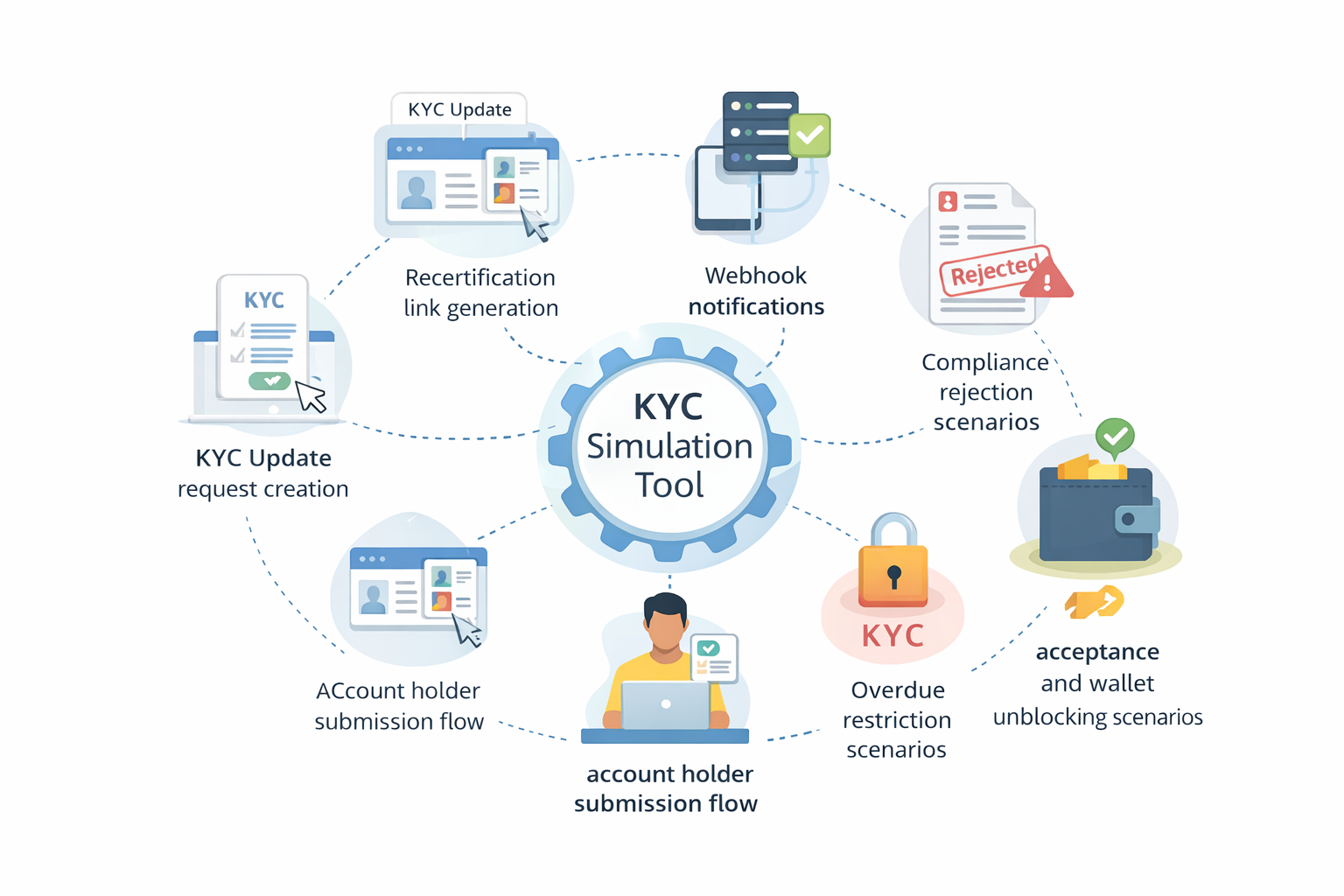
4. What you can test
Using this sandbox flow, you can test:
5. Understanding the KYC Update objects
KYC Update introduces two key sub-objects on the account object.
5.1 Requirements
The requirements object tracks the lifecycle of the KYC Update request.
A typical entry includes:
idtype: KYC_UPDATEdueDatestatus, such as:REQUESTED,UNDER_ANALYSIS, orREJECTED
{
  ...
  "requirements": [
    {
      "id": "6ca90af5-4892-4cfb-b5fe-56b95a85e987",
      "type": "KYC_UPDATE",
      "dueDate": "2026-04-11T18:01:33.908Z",
      "status": "REQUESTED"
    }
  ],
}
When the KYC update is accepted, the requirements array becomes empty. There is no persistence.ACCEPTED value stored in the object. This empty state is the expected signal that the validation is complete.
5.2 Restrictions
The restrictions object tracks the restriction applied when the KYC Update becomes overdue.
A typical entry includes:
idcategory: KYCreason: KYC_OUTDATEDactivatedAtdaterequirementIds
"restrictions": [
    {
      "id": "5690c336-ac61-451c-ae2d-0c02d3748557",
      "category": "KYC",
      "reason": "KYC_OUTDATED",
      "activatedAt": "2026-03-12T19:02:06.269Z",
      "requirementIds": [
        "6ca90af5-4892-4cfb-b5fe-56b95a85e987"
      ]
    }
  ],
When the KYC update is accepted, the restrictions array also becomes empty, and the wallets are automatically unblocked.
6. Understanding Notifications
You should also monitor the webhook notifications associated with KYC Update.
6.1 Notification 53 - RequirementChange
Notification 53 is sent whenever the KYC Update requirement changes state, including:
REQUESTEDUNDER_ANALYSISREJECTED- Acceptance, when the
requirementsobject is cleared
Payload (Schema)
| Field | Type | Required | Description |
|---|---|---|---|
EventDate | ISO 8601 DateTime | Yes | Timestamp of the event |
Type | String | Yes | Type of requirement (currently: KYC_UPDATE) |
Status | String | Yes | Current status of the requirement |
NotifCategory | String | Yes | Always 53 for this notification |
RequirementID | String | Yes | Identifier of the requirement |
AccountID | UUID | No | Account linked to the requirement |
ProfileID | UUID | No | Profile linked to the requirement |
WalletExternalID | UUID | No | External wallet identifier |
WalletInternalID | UUID | No | Internal wallet identifier |
OnboardingID | String | No | Onboarding identifier, if applicable |
DueDate | Date (YYYY-MM-DD) | No | Due date for the requirement submission |
6.2 Notification 54 - RestrictionChange
Notification 54 is sent when a KYC_OUTDATED Restrictions can be either activated or removed from the account.
Payload (Schema)
| Field | Type | Required | Description |
|---|---|---|---|
EventDate | ISO 8601 DateTime | Yes | Timestamp of the event |
Category | String | Yes | Category of the restriction (currently: KYC) |
Reason | String | Yes | Reason for the restriction (currently: KYC_OUTDATED) |
ActivatedAt | Date (YYYY-MM-DD) | Yes | Date the restriction was activated |
RemovedAt | Date (YYYY-MM-DD) | Yes | Date when the restriction was removed |
NotifCategory | String | Yes | Always 54 for this notification |
RestrictionID | UUID | Yes | Identifier of the restriction |
OnboardingID | String | No | Onboarding identifier, if applicable |
AccountID | UUID | No | Account linked to the restriction |
ProfileID | UUID | No | Profile linked to the restriction |
WalletExternalID | UUID | No | External wallet identifier |
WalletInternalID | UUID | No | Internal wallet identifier |
RequirementIDs | UUID[] | No | List of requirement IDs linked to this restriction |
These notifications are an important part of end-to-end testing, as they allow you to verify your webhook handling, your platform logic, and your customer messaging flows.
7. Sandbox Simulation Endpoint
The guide describes a dedicated sandbox simulation endpoint supporting the following actions:
7.1 Path Parameters
Full path: HTTPS://{{onboarding-api-gateway-path}}/accounts/{{accountId}}/simulate-kyc-update
Endpoint: POST /accounts/{{accountId}}/simulate-kyc-update Body: { "action": "ACCEPTED" }
Possible values:
{
  "action": "REQUESTED" | "REJECTED" | "OVERDUE" | "ACCEPTED"
}
7.2 Responses
Success:
- 204 KYC status updated successfully
Errors:
- 400 Missing or invalid request parameters
- 401 Missing or invalid authentication token
- 404 Account not found
- 422 Invalid action for current KYC state
- 500 Unexpected server error
Each action simulates a Lemonway-controlled event that you would not normally be able to trigger yourself in production.
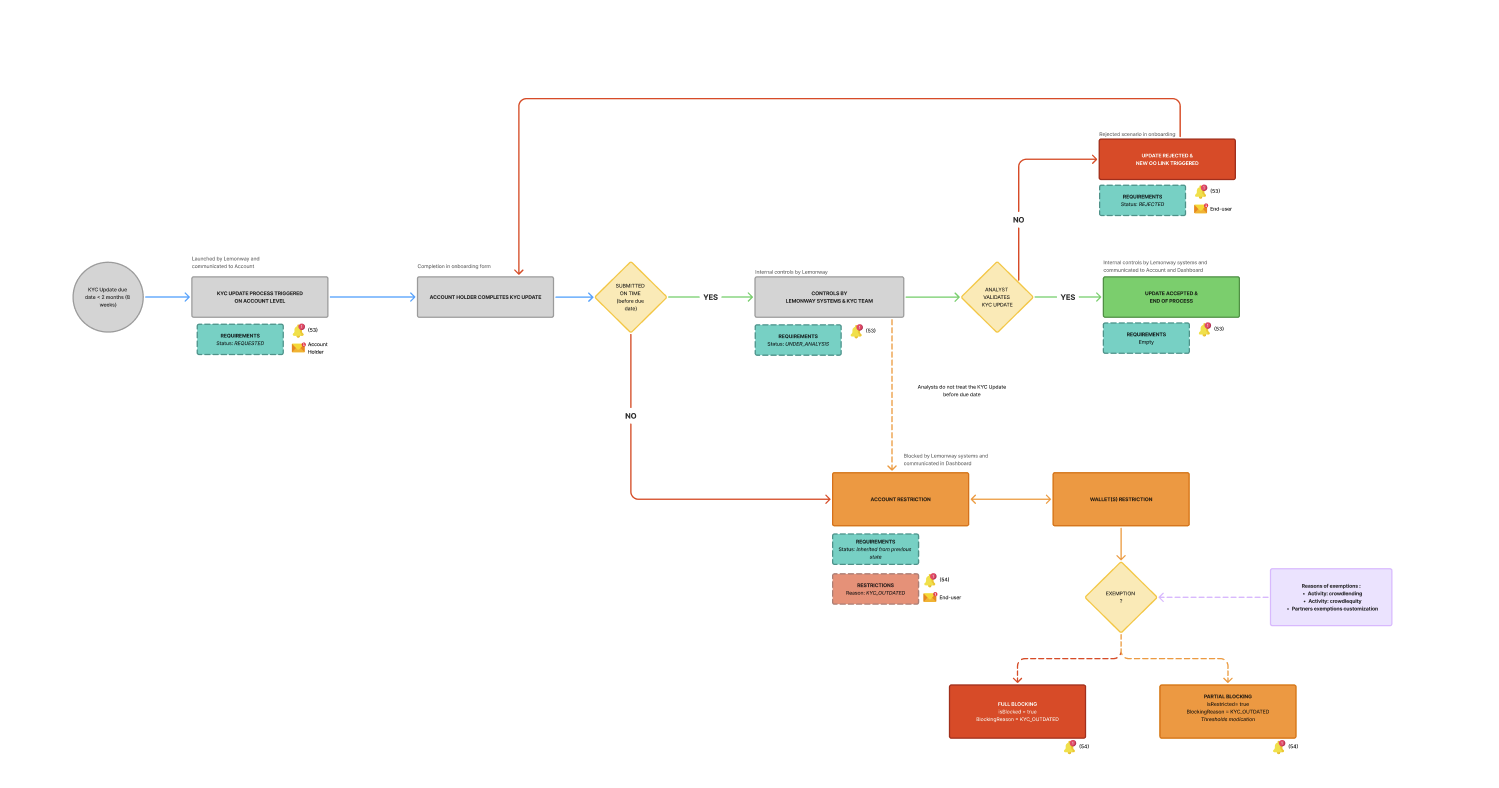
7.3 What each action simulates
REQUESTED
REQUESTEDThis simulates Lemonway triggering a KYC Update request on the account. This action allows you to test the beginning of the KYC Update lifecycle.
Expected effects:
- A new
requirementsentry is created withtype: KYC_UPDATEandstatus: REQUESTED - A new Online Onboarding is generated from the existing account data.
- Notification 53 is sent.
- An email may be sent to the account holder if email notifications are enabled.
REJECTED
REJECTEDSimulates Lemonway's compliance team rejecting a submitted KYC Update; the action allows you to test rejection handling and resubmission journeys.
Expected Results:
- The
requirements.statusbecomesREJECTED - Notification 53 is sent.
- The linked onboarding is also set to
REJECTED - An email may be sent to the account holder requesting resubmission.
OVERDUE
OVERDUEThis simulates the automated overdue check once the KYC deadline has passed. It allows you to test scenarios involving overdue blocking and wallet restrictions.
Expected Results:
- The current
requirementsentry remains in place. - A
restrictionsentry is created withreason: KYC_OUTDATED - linked wallets are blocked or restricted depending on the applicable mode
- Notification 54 is sent.
- An urgent email may be sent to the account holder if enabled
ACCEPTED
ACCEPTEDThis simulates final validation by Lemonway compliance. Allows you to test the successful completion and restoration of access.
Expected Results:
requirementsbecomes[]emptyrestrictionsbecomes[]empty- Wallets are automatically unblocked if previously blocked
- Notification 53 is sent.
8. What end-to-end test should you do
A complete sandbox test should cover the following areas.
8.1 Account State
You should verify an account state using:
GET /accounts/{accountId}In particular, you should monitor:
requirementsrestrictions
8.2 Webhook Reception
You should verify that your platform correctly receives and processes:
- Notification 53 for requirement lifecycle changes
- Notification 54 for restriction creation
8.3 Recertification Link Management
You should retrieve the onboardingId, generate a recertification link, and share it with the account holder using:
GET /onboardings/{onboardingId}/resume- The link expires 7 days after generation
- The link expires after the first click, even if the form is not completed
- A new link can be regenerated at any time
- The link remains valid even when the account is restricted
- The KYC Update creates a new
onboardingId, different from the one used for the initial onboarding
8.4 Account Holder and Operational Flows
You should verify how your platform behaves when:
- A KYC Update is requested
- An account holder submits, and the request moves to review
- A request is rejected
- An account becomes overdue and restricted
- If an account holder resubmits after rejection
- When an account is finally accepted and unblocked
Updated about 1 month ago