
Handling KYC updates v2
How do I handle KYC Updates?
What is it?
KYC updates are a core component of maintaining accurate user records at Lemonway, forming part of an ongoing, periodic process that ensures compliance and data integrity throughout the entire account lifecycle. We ask users to review and refresh their KYC data at defined intervals, which are outlined in this document. This document helps you understand the process, who is and is not concerned, and what can be done to ensure smooth updates for your clients.p
Who is concerned?
All users with an active business relationship and a validated account are required to participate, including the following categories:
| User Type | Category |
|---|---|
| Merchant | Marketplace |
| Seller | Marketplace |
| Investor / Lender | Crowdfunding |
| Project Holder | Crowdfunding |
| Creditor | Financial Roles |
| Content Editor | Platform Operators |
| Other Operator | Platform Operators |
| Visa Applicant | Other |
Note
- Migrated Accounts: Clients that have opened a payment account before the online onboarding activation and that have been linked to an Account via the migration process are included in the KYC Update process.
- Premium Accounts: Included in the KYC Update process with specific communication workflow
Who is excluded?
- Users with technical wallets only
- Buyers
- Donors
- Operators
- Payers *(Visa Application account activity))
KYC Refresh Rate
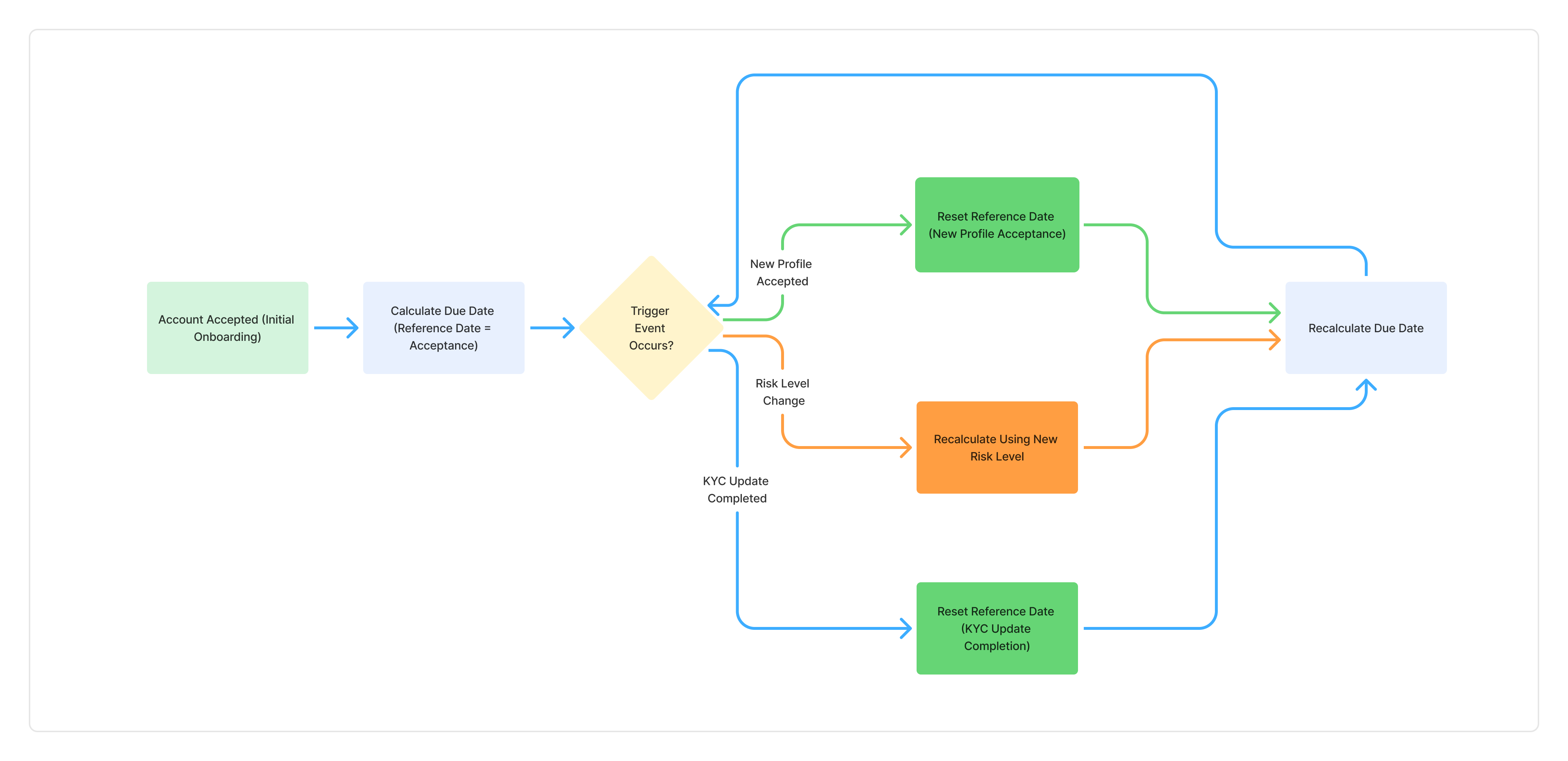
KYC Updates at Lemonway are based on an event-driven model. Rather than being fixed at onboarding, the next KYC Update due date evolves throughout the account lifecycle. Each time a relevant event occurs, the system:
- Identifies a reference date (linked to the triggering event).
- Applies the current risk level of the end-user.
- Recalculates the next KYC Update due date accordingly.
Why is this essential?
It ensures that KYC obligations remain:
- Aligned with Lemonway's regulatory requirements.
- Information changes according to the latest risk profile.
- Information is synchronised with the most recent business activity.
| Trigger Event | Reference Date Used | Risk Level Applied | Resulting Action |
|---|---|---|---|
| Account accepted (onboarding) | Account acceptance date | Initial risk level | Calculate the next KYC Update due date |
| New profile accepted | New profile acceptance date | Current risk level | Recalculate due date |
| Risk level change | ⚠️ To confirm (see note below) | New risk level | Recalculate due date |
| KYC Update completed | KYC Update completion date | Current risk level | Recalculate due date |
KYC refresh depends on the risk level associated with the account holder:
| Risk Level | Frequency |
|---|---|
| High | Every 12 months |
| Medium | Every 3 years |
| Low | Every 5 years |
Note
ImportantThe next due date is recalculated:
- After each KYC validation
- If risk level changes
- If the account structure changes
What is updated?
| Category | Sub-category | Example Details |
|---|---|---|
| Individuals | Personal Information | Name, DOB, nationality |
| Contact & Address | Email, phone, residential address | |
| Professional & Financial Data | Employment, income, source of funds | |
| Political Exposure | PEP status | |
| Legal Entities | Company Details | Name, registration number, legal form |
| Activity & Financials | Business activity, revenue, accounts | |
| Shareholding Structure | Ownership breakdown | |
| UBO / Legal Representative | Beneficial owners, directors | |
| Documents | Identity Verification | ID, passport (individuals) |
| Corporate Documents | Articles, registry docs (onboarding rules) |
How it works (High Level)
flowchart LR
    A[REQUESTED] --> B[UNDER_ANALYSIS]
    B --> C[ACCEPTED]
    B --> D[REJECTED]
    A --> E[OUTDATED → Restriction]
    D --> B
Status lifecycle
| Status | Meaning |
|---|---|
REQUESTED | User must submit KYC |
UNDER_ANALYSIS | Under compliance review |
REJECTED | Additional info required |
| (Accepted) | Requirement removed |
📌 Acceptance is not a status — the requirement disappears.
API Overview
Account object additions
{
  "requirements": [
    {
      "id": "uuid",
      "type": "KYC_UPDATE",
      "dueDate": "2026-04-11T18:01:33.908Z",
      "status": "REQUESTED"
    }
  ],
  "restrictions": [
    {
      "id": "uuid",
      "category": "KYC",
      "reason": "KYC_OUTDATED",
      "activatedAt": "2026-03-12T19:02:06.269Z",
      "requirementIds": ["uuid"]
    }
  ]
}
Key endpoints
GET /accounts
GET /accounts/{id}
GET /onboardings/{onboardingId}/resumerequirements→ track KYC update progressrestrictions→ indicate account limitations
Webhooks
Requirement updates (Notification 53)
Triggered on any status change:
{
  "Type": "KYC_UPDATE",
  "Status": "REQUESTED",
  "NotifCategory": "53",
  "RequirementID": "uuid",
  "AccountID": "uuid",
  "DueDate": "2026-01-12"
}
Restriction updates (Notification 54)
Triggered when the account is restricted:
{
  "Category": "KYC",
  "Reason": "KYC_OUTDATED",
  "NotifCategory": "54",
  "RestrictionID": "uuid",
  "AccountID": "uuid",
  "RequirementIDs": ["uuid"]
}
Account Restriction Logic
If KYC is not completed before the deadline:
→ Account becomes KYC_OUTDATED
Two modes
| Mode | Behavior |
|---|---|
isBlocked = true | All transactions blocked |
isRestricted = true | Limited transactions allowed |
Example restriction logic
Investors / Lenders
{
  payIn: 0,
  payOut: 0,
  p2pOut: 0,
  p2pIn: "allowed"
}
Project Holders
{
  payIn: "allowed",
  payOut: 0,
  p2pOut: "allowed",
  p2pIn: 0
}
📌 Custom rules can be configured per partner.
Recertification Link
Used to redirect users to complete their KYC update.
GET /onboardings/{onboardingId}/resumeRules
- Valid for 7 days
- Single-use
- Can be regenerated anytime
Partner Responsibilities
On REQUESTED
REQUESTED- Generate and share the recertification link
- Monitor due date
On UNDER_ANALYSIS
UNDER_ANALYSIS- Update UI (e.g. "Under review")
On REJECTED
REJECTED- Notify user to resubmit
On KYC_OUTDATED
KYC_OUTDATED- Block or restrict user actions
- Prompt immediate completion
On completion
- Detect:
"requirements": []
"restrictions": []
→ Restore access
Key Behaviours to Know
- Account status remains
ACCEPTEDthroughout - KYC Update is handled via requirements & restrictions, not account status
- Users can still complete KYC even if restricted
- Each KYC update generates a new onboarding flow
FAQ (Short Version)
How do I detect a KYC update?
→ Check requirements or listen to webhook 53
How do I know it's completed?
→ requirements and restrictions are empty
Can users submit after being blocked? → Yes, via recertification link
Can I manage communication myself? → Yes (disable Lemonway emails and use webhooks)
Summary
KYC Update is a lifecycle process built around:
- Requirements → what needs to be done
- Restrictions → what happens if not done
As a partner, your role is simple:
- Listen to webhooks
- Guide the user
- Trigger the recertification flow
Everything else is handled by Lemonway.
Updated 1 minute ago